

Understanding Object-Oriented Programming (OOP) in Python
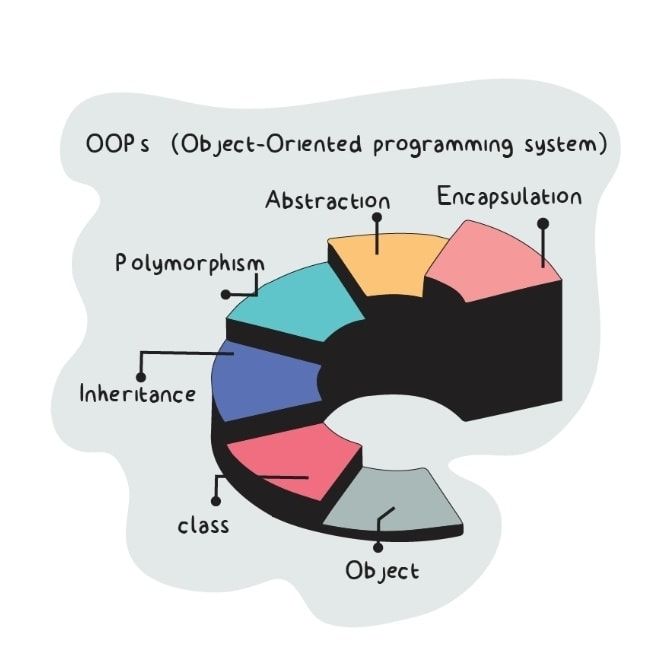
During the second week of my internship at DataraFlow, I had the opportunity to deepen my understanding of object-oriented programming (OOP), iterators, and scope management in Python. While I had previously encountered these concepts, applying them in structured tasks revealed more about how they work.
In this article, I will share my experience from the second week, detailing the key lessons learned, the challenges encountered, and the strategies I employed to overcome them.
Key Lessons Learned
1. Overview of Object-Oriented Programming (OOP)
OOP is the practice of creating objects in programs to simplify the code and ensure easier program maintenance. An object in Python is an instance of a class, which bundles attributes and methods together. That is, once you instantiate a class, you have automatically created an object of that class. You can think of a class as a recipe. It describes the ingredients (attributes) and steps (methods or functions), but the cake (object) is made when you follow the recipe.
In the code example below, the Calculator class acts as a blueprint for creating objects that can perform basic arithmetic operations. It contains multiple functions (methods) - add(), subtract(), multiply(), and divide() - each handling a different task. Instead of writing separate functions outside, grouping them inside a class keeps related operations organized and reusable.
class Calculator:
    def add(self, x, y):
        return x + y

    def subtract(self, x, y):
        return x - y

    def multiply(self, x, y):
        return x * y

    def divide(self, x, y):
        if y == 0:
            return "Error! Division by zero not allowed."
        return x / y
When we create an object calc = Calculator(), we can call any of these functions through that object, like calc.add(5, 3). This demonstrates how a class can bundle attributes and multiple functions (methods) into a single unit, making code simpler and easier to maintain.
# Create an object
calc = Calculator()

# Call the add() function of the object
print(calc.add(10, 5))
# Call the subtract() function of the object
print(calc.subtract(10, 5))
# Call the multiply() function of the object
print(calc.multiply(10, 5))
# Call the divide() function of the object
print(calc.divide(10, 5))
Output:
15
5
50
2
We can also create multiple objects of the same Calculator class (calc1, calc2, calc3, etc):
# First object
calc1 = Calculator()
# Second object
calc2 = Calculator()
# Third object
calc3 = Calculator()
2. The __init__() Method
The Python __init__() method is used to set up and initialize the attributes of a class when the class is instantiated. In the code example below, the __init__() method of the Person class tells us that the class must contain two attributes (name and age) before it can work, and it also initializes those attributes once the class is instantiated as an object. In initializing the attributes, it attaches the attributes to the class itself using the self label. This enables us to access the attributes using the syntax class_object.attribute (Like in the code below, we can access the name attribute of our created object p1 by running p1.name).
class Person:
    def __init__(self, name, age):
        self.name = name
        self.age = age

# An object of Person class
p1 = Person("Franklin", 16)
# Access the name attribute
print(p1.name)
Output:
Franklin
Note that the self label is used to create a reference to a class and it can be any word. Different functions of a class can have different words for self, but it must be the first parameter in the functions. In the code example below, the __init__() method has abc in place of self, while the my_function() method has mine in place of self. They are different but they are both references to the same class since they are the first parameter in their respective methods.
class Person:
    def __init__(abc, name, age):
        abc.name = name
        abc.age = age
    def my_function(mine):
        return f"My name is {mine.name}"

# An object of Person class
p1 = Person("Franklin", 16)
# Call my_function() in the object
print(p1.my_function())
Output:
My name is Franklin
3. The __str__() Method
When we print an object, we will get a ‘strange-looking’ output <__main__.Person object at 0x7dd914e361e0> as seen in the code example below. This ‘non-human-friendly’ output tells us the class name and its memory address.
class Person:
    def __init__(self, name, age):
        self.name = name
        self.age = age

# An object of the Person class
p1 = Person("Franklin", 16)
# Print the object
print(p1)
<__main__.Person object at 0x7dd914e361e0>
For us to get a readable, human-friendly output whenever we try to print an object, we make use of the __str__() method. By adding the method as shown below, we will get the name and age attributes of the object when we try to print the object.
class Person:
    def __init__(self, name, age):
        self.name = name
        self.age = age
    def __str__(self):
        return f"{self.name}({self.age})"

# An object of the Person class
p1 = Person("Franklin", 16)
# Print the object
print(p1)
Output:
Franklin(16)
4. Class Inheritance
This is the practice of making a class inherit the attributes and methods of another class. In the code example below, the class Vehicle is the parent class (also known as the base class or superclass). It defines the basic attributes that any vehicle should have, namely brand and model. By itself, this class acts as a blueprint for all types of vehicles, ensuring that whenever we create an object from it or extend it into another class, those objects will carry the same basic attributes. This reduces redundancy, since attributes common to many vehicle types only need to be defined once in the parent class. The class Car is a child class (also known as derived class or subclass) that inherits from Vehicle. This means it automatically has access to all the properties and methods of Vehicle, such as brand and model, without needing to rewrite them. However, Car extends the parent class by adding a new attribute, doors, which is specific to cars but not necessarily to all vehicles. In this way, inheritance allows us to build on existing attributes while introducing specialized attributes.
# A class named 'Vehicle' that takes two parameters: 'brand' and 'model'
class Vehicle:
    def __init__(self, brand, model):
        # Attribute to store brand
        self.brand = brand
        # Attribute to store model
        self.model = model

# A subclass named 'Car' that inherits from 'Vehicle' class
class Car(Vehicle):
    # Add the 'doors' parameter
    def __init__(self, brand, model, doors):
        # Keep the inheritance from the parent class 'Vehicle'
        super().__init__(brand, model)
        # Attribute to store doors
        self.doors = doors
Note that when introducing specialised attributes in a child class, the inherited basic attributes from the parent class gets overriden. To prevent this and maintain the basic attributes, we use the syntax parent_classname.__init__(self, basic_attributes) or super().__init__(basic_attributes). It is recommended to use the latter syntax super().__init__(basic_attributes). When you use Parent_classname.__init__(self, basic_attributes), you are hard-coding the parent’s name into the child class. If later on you decide to rename the parent class or change the inheritance structure, you must go through all child classes and manually update the parent’s name. This makes maintenance tedious and error-prone. By contrast, super().__init__(basic_attributes) does not require you to reference the parent explicitly, as it follows Python’s Method Resolution Order (MRO). That means if you rename or restructure inherited classes, you do not need to touch the child class code, which makes the program easier to maintain.
5. Python’s Method Resolution Order (MRO)
The Method Resolution Order (MRO) in Python is the set of rules that is followed when searching for a method or attribute in a class hierarchy. Whenever you call a method on an object, Python first looks inside the class of that object. If the method is not found there, it begins searching through the parent classes in a specific sequence until it finds a match. This search order is what we call the MRO.
In the case of single inheritance, the MRO is straightforward. For example, in the code below, we have a class Bicycle that inherits from Car, which in turn inherits from Vehicle. If we call the move() method on an object of class Bicycle, Python will check class Bicycle first, then move to Car, and finally to Vehicle. When it finds the move() method in class Vehicle, it prints ‘Moving’.
class Vehicle:
    def move(self):
        return "Moving"

class Car(Vehicle):
    pass

class Bicycle(Car):
    pass

# Create an object instance of Bicycle class
bicycle = Bicycle()
# Call the move() method
print(bicycle.move())
Output:
Moving
The importance of MRO becomes even clearer in the case of multiple inheritance, where a class inherits from more than one parent. Without a defined order, it could be confusing to know which parent’s method should take precedence when the same method exists in multiple parents. Python resolves this by following a consistent order in which parent classes are checked. This prevents conflicts and ensures fairness across complex inheritance hierarchies. For example, in the code below, class Bicycle inherits from both Vehicle and Car, and both parents define the same move() method. Python resolves this by checking the MRO of Bicycle, which is [Bicycle -> Vehicle -> Car -> object]. This means Bicycle will use Car’s version of the method first, avoiding ambiguity.
class Vehicle:
    def move(self):
        return "Moving"

class Car:
    def move(self):
        return "Car is moving"

class Bicycle(Vehicle, Car):
    pass

bicycle = Bicycle()
print(bicycle.move())
Output:
Moving
Another practical aspect of MRO is its relationship with the super() function, as discussed earlier. When super() is used inside a class with multiple inheritance, Python follows the MRO to determine which class’s method to call next. This means that instead of directly hard-coding the parent class name, you can rely on super() to navigate the hierarchy in the correct order automatically. For example, in the code below, class Bike inherits from both Car and Bicycle, and both parent classes inherit from a common parent class Vehicle. Since each class has its own version of the move() method, then calling super().move() inside one of the classes will not simply call the immediate parent’s method, but instead will follow the Method Resolution Order (MRO), which is [Bike → Car → Bicycle → Vehicle]. This shows that super().move() does not necessarily mean “call the direct parent,” but instead “call the next method in the MRO.”
class Vehicle:
    def move(self):
        print("Moving")

class Car(Vehicle):
    def move(self):
        super().move()
        print("Car is moving")

class Bicycle(Vehicle):
    def move(self):
        super().move()
        print("Bicycle is moving")

class Bike(Car, Bicycle):
    def move(self):
        super().move()
        print("Bike is moving")

bike = Bike()
bike.move()

# Output:
# Moving
# Bicycle is moving
# Car is moving
# Bike is moving
6. Polymorphism
This is the ability of a single method to be used by multiple classes, and that single method behaves differently with each class. For instance, in the code below, both the Car and Bicycle classes define a method named move(), but each provides its own implementation. In Car, the method prints ‘Car drives’, while in Bicycle it prints ‘Bicycle pedals’. In the for loop, the same method call vehicle.move() is used on different object types. Even though the loop does not know in advance whether the object is a Car or a Bicycle, Python automatically determines the correct version of move() to execute. Polymorphism allows the code to be reusable, since new vehicle types could be added with their own move() method without modifying the loop.
class Car:
    def move(self):
        return "Car drives"

class Bicycle:
    def move(self):
        return "Bicycle pedals"

for vehicle in [Car(), Bicycle()]:
    print(vehicle.move())
Output:
Car drives
Bicycle pedals
7. Iterators
An iterator in Python is an object that lets you go through a sequence of items one at a time, without needing to know all the items in advance. It has two special methods: __iter__() (which returns the iterator itself) and __next__() (which returns the next item in the sequence). Each time you call next() on an iterator, it gives you the next value, and when there are no more items, it raises a StopIteration error to signal the end. This is the mechanism that makes Python’s for loops. It is important to note that iterators are different from iterables. Iterables are containers of data (like a list, tuple, string, or dictionary), while iterators are tools that fetch data from those containers step by step. For example, in the code below, the list ([1, 2, 3]) is an iterable, but calling iter([1, 2, 3]) produces an iterator that knows how to move through the list one element at a time until it’s exhausted.
mylist = [1,2,3]
myiterator = iter(mylist)
print(myiterator)
print(next(myiterator))
print(next(myiterator))
print(next(myiterator))
print(next(myiterator))
Output:
<list_iterator object at 0x7c1cbc943730>
1
2
3
StopIteration:
The code example below shows how a custom iterator works by creating a CountDown class. The class starts with an initial number n, and by defining the special methods __iter__() and __next__(), it becomes an iterator that can be used in a for loop. Each time __next__() is called, it returns the current value of n and then decreases it by one, so the numbers are produced in descending order. Once n reaches zero, a StopIteration error is raised, which tells Python that the loop has finished. When we run the for loop with CountDown(10), Python automatically calls these iterator methods behind the scenes, printing the numbers from 10 down to 1 one step at a time.
# A class named 'CountDown' that takes a parameter 'n'
class CountDown:
    def __init__(self, n):
        # Attribute to store 'n'
        self.n = n
    # Make the 'CountDown' class an iterator
    def __iter__(self):
        return self
    def __next__(self):
        if self.n <= 0:
            raise StopIteration
        current = self.n
        self.n -= 1
        return current
# Instantiate the 'CountDown' iterator
for number in CountDown(10):
    print(number)
Output:
10
9
8
7
6
5
4
3
2
1
8. Scope and the Importance of Naming
In Python, scope simply means the part of the program where a variable can be seen and used. Think of it like the boundaries of a room: a variable created inside one room (like inside a function) can only be used in that room unless it is specifically passed out. Python follows the LEGB rule. It looks for variables in the Local scope first (inside the function), then in the Enclosing scope (outer functions), then in the Global scope (outside the function), and finally in the Built-in scope (Python’s own reserved names, like len or print). For instance, in the code below, when the inner() function runs, it prints "local" because Python finds the variable x defined in the local scope of inner(). When control returns to the outer() function, it prints "enclosing", since the closest definition of x is in the enclosing scope of outer(). Outside both functions, Python prints "global", because it now uses the global scope where x was first defined. Finally, when calling len([1, 2, 3]), Python doesn’t find len in any of the local, enclosing, or global scopes, so it looks into the built-in scope and uses Python’s built-in len() function.
# Global variable
x = "global"

def outer():
    # Enclosing variable
    x = "enclosing"

    def inner():
        # Local variable
        x = "local"
        print("Value inside inner():", x)

    inner()
    print("Value inside outer():", x)

outer()
print("Value in global scope:", x)

# Built-in scope example
print("Length of list:", len([1, 2, 3]))
Output:
Value inside inner(): local
Value inside outer(): enclosing
Value in global scope: global
Length of list: 3
The global and nonlocal keywords are used to change how variables are accessed and modified across different scopes. Normally, if you assign a value to a variable inside a function, Python treats it as a local variable. However, if you want to modify a variable defined in the global scope (outside any function), you must declare it with global inside the function; otherwise, Python will assume you are creating a new local variable. Similarly, nonlocal is used inside nested functions to tell Python that a variable should not be treated as local to the inner function, but rather refer to a variable in the enclosing scope (the nearest outer function).
For example, the code below shows how global and nonlocal work with variable scopes. At the start, x = 10 is defined in the global scope, and y = 20 is defined in the enclosing scope inside outer(). When inner() is called, declaring global x tells Python to use and update the x in the global scope, changing it from 10 to 100. Similarly, nonlocal y tells Python to use the y defined in the enclosing function outer(), updating it from 20 to 200. Without these keywords, Python would treat x and y as new local variables inside inner().
# Global variable
x = 10

def outer():
    # Enclosing variable
    y = 20

    def inner():
        global x
        nonlocal y
        # Updates the global variable
        x = 100
        # Updates the enclosing variable
        y = 200
        print(f"Inside inner(): x = {x}, y = {y}")

    inner()
    print(f"Inside outer(): x = {x}, y = {y}")

outer()
print(f"In global scope: x = {x}")
We can see that scope makes sure variables don’t clash with each other and keeps our code organized, but it also means you have to be careful with naming to avoid conflicts with Python’s built-ins. For example, the code below demonstrates how scope affects variable behavior in Python. At the start of the function, calling len(my_list) correctly uses Python’s built-in len() function to return the length of the list. However, once a local variable named len is created and assigned the value 100, it shadows the built-in len within that local scope. From that point onward, len no longer refers to the built-in function but to the integer 100. As a result, the next attempt to call len(my_list) fails, because Python tries to treat the integer 100 as a function, which is not possible.
def show_len_behavior():
    # Call the built-in len() function on a list
    my_list = [1, 2, 3]
    print("Length of list:", len(my_list))

    # A local variable named 'len'
    len = 100
    print("Local variable len:", len)

    # Call the built-in len() function on a list, again
    print("Length of list:", len(my_list))

# Call the function
show_len_behavior()
Output:
UnboundLocalError: cannot access local variable 'len' where it is not associated with a value
9. Building a Library Management System
I built a simple Library Management System (LMS) to demonstrate the programming concepts discussed: Object-Oriented Programming (OOP), scope, and iterators.
# A program for a Library Management System
# A class named 'Book' that takes in three parameters: 'title', 'author', and 'year'
class Book:
    def __init__(self, title, author, year):
        self.title = title
        self.author = author
        self.year = year
        # Define the initial state of the book as not borrowed
        self.borrowed = False

    # Method to get the book description
    def get_description(self):
        return f"'{self.title}' by {self.author} ({self.year})"

# A subclass named 'Ebook' that inherits from 'Book' class
class EBook(Book):
    def __init__(self, title, author, year, file_size, file_format):
        super().__init__(title, author, year)
        # Attributes specific to the 'Ebook' class
        self.file_size = file_size
        self.file_format = file_format

    # Override the get_description() method in parent class 'Book'
    def get_description(self):
        return f"E-Book: {self.title} by {self.author}, {self.year}. Size: {self.file_size}MB, Format: {self.file_format}"

# A subclass named 'PrintedBook' that inherits from 'Book' class
class PrintedBook(Book):
    def __init__(self, title, author, year, weight, dimensions):
        super().__init__(title, author, year)
        # Attributes specific to the 'PrintedBook' class
        self.weight = weight
        self.dimensions = dimensions

    # Override the get_description() method in parent class 'Book'
    def get_description(self):
        return f"Printed Book: {self.title} by {self.author}, {self.year}. Weight: {self.weight}g, Dimensions: {self.dimensions}"

# A class named 'Member' that takes in two parameters: 'name' and 'member_id'
class Member:
    # Class variable to keep track of total borrowed books across members
    total_borrowed_books = 0

    def __init__(self, name, member_id):
        self.name = name
        self.member_id = member_id
        # Protected attribute to store the list of borrowed books
        self._borrowed_books = []

    def borrow_book(self, book, borrow_limit):
        # Check if the borrowing limit has been reached
        if len(self._borrowed_books) >= borrow_limit:
            print(f"{self.name} cannot borrow more books. Borrowing limit of {borrow_limit} reached.")
        # Check if the book is already borrowed
        elif book.borrowed:
            print(f"'{book.title}' has already been borrowed by another member.")
        else:
            # Borrow the book successfully
            self._borrowed_books.append(book)
            book.borrowed = True
            Member.total_borrowed_books += 1
            print(f"{self.name} borrowed '{book.title}' successfully.")

    # Make the class an iterator over borrowed books
    def __iter__(self):
        # Initialize an index for iteration.
        self.index = 0
        return self

    # Generate the borrowed books
    def __next__(self):
        if self.index < len(self._borrowed_books):
            book = self._borrowed_books[self.index]
            self.index += 1
            return book
        else:
            if not self._borrowed_books and self.index == 0:
                print(f"{self.name} has no borrowed books.")
            raise StopIteration

# A subclass StudentMember that inherits from Member.
class StudentMember(Member):
    def __init__(self, name, member_id, grade_level):
        super().__init__(name, member_id)
        # Initialize grade_level specific to StudentMember
        self.grade_level = grade_level

    # Students can borrow up to 10 books
    def borrow_book(self, book):
        super().borrow_book(book, borrow_limit=10)

# A subclass TeacherMember that inherits from Member.
class TeacherMember(Member):
    def __init__(self, name, member_id, department):
        super().__init__(name, member_id)
        # Initialize department specific to TeacherMember
        self.department = department

    # Teachers can borrow up to 20 books
    def borrow_book(self, book):
        super().borrow_book(book, borrow_limit=20)


# Main Library class to manage books and members
class Library:
    def __init__(self, library_name):
        # Initialize a private attribute to store library name
        self.__library_name = library_name
        # Initialize an empty list to store all books in the library.
        self.books = []
        # Initialize an empty list to store all members in the library.
        self.members = []

    # Make the Library class iterable.
    def __iter__(self):
        # Initialize an index for iteration.
        self._index = 0
        return self

    # Method to return the next book in the library.
    def __next__(self):
        if self._index < len(self.books):
            book = self.books[self._index]
            self._index += 1
            return book
        else:
            raise StopIteration

    # Add a new book to the library
    def add_book(self, book):
        self.books.append(book)
        print(f"Added book: {book.get_description()}")

    # Add a new member to the library
    def add_member(self, member):
        self.members.append(member)
        print(f"Added member: {member.name}")

    # Getter method to safely access the private library name
    def get_library_name(self):
        return self.__library_name

    # Setter method to modify private library name
    def set_library_name(self, name):
        self.__library_name = name

    # Method to search for books by title or author in lower case
    def search_books(self, keyword):
        return [book.get_description() for book in self.books
                if keyword.lower() in book.title.lower()
                or keyword.lower() in book.author.lower()]
From an OOP perspective, the system models real-world entities such as Book, EBook, PrintedBook, Member, StudentMember, TeacherMember, and Library as classes. Each class encapsulates its data (attributes) and behaviors (methods). Inheritance is also used. EBook and PrintedBook extend the Book class with specific attributes and override the get_description() method, while StudentMember and TeacherMember extend Member with different borrowing rules. This structure showcases OOP principles like encapsulation, inheritance, and polymorphism.
In terms of scope, the program makes use of different levels of variable accessibility. For instance, self.__library_name is defined as a private attribute within the Library class, only accessible through getter and setter methods. The _borrowed_books list in Member is a protected attribute, meant to be accessed only within the class and its subclasses. At the class level, Member.total_borrowed_books is a class variable that keeps track of all borrowed books across members, showing how variables can exist in different scopes - local to methods, shared across objects, or private to a class.
The program also implements iterators to make the system more Pythonic. The Member class defines __iter__() and __next__(), allowing iteration over the books borrowed by a member using a simple for loop. Similarly, the Library class is made iterable so that all books in the library can be looped through without manually handling indices. By implementing these special methods, the classes behave like built-in collections, simplifying how books and borrowed lists are accessed.
Demonstration of the Library Management System:
# Demonstration of the Library Management System

# Create an instance of the Library class.
library = Library("The Chosen Library")

# Call the getter method to retrieve and print the library's private name.
print(f"Library Name: {library.get_library_name()}\n")

# Instances of different book types
book1 = PrintedBook("Mere Christianity", "C.S. Lewis", 1952, 250, "5x8")
book2 = PrintedBook("The Case for Christ", "Lee Strobel", 1998, 300, "5.5x8.5")
book3 = EBook("The Pilgrim's Progress", "John Bunyan", 1678, 1.2, "EPUB")
book4 = EBook("The Alchemist", "Paulo Coelho", 1988, 10, "PDF")


# Add the created book objects to the library.
library.add_book(book1)
library.add_book(book2)
library.add_book(book3)
library.add_book(book4)

# Instances of different member types.
student1 = StudentMember("Franklin", "S001", 100)
student2 = StudentMember("Jonathan", "S002", 200)
teacher1 = TeacherMember("Mr. David", "T001", "Theology")
teacher2 = TeacherMember("Mr. Acosta", "T002", "Theology")

# Add the created member objects to the library.
library.add_member(student1)
library.add_member(student2)
library.add_member(teacher1)
library.add_member(teacher2)

# Demonstrate polymorphism by having different member types borrow books with their specific limits.
student1.borrow_book(book1)
teacher1.borrow_book(book2)

# Show total borrowed books
print(f"\nTotal borrowed books across all members: {Member.total_borrowed_books}\n")

# Attempt to borrow the same book1 again to show the availability check.
student2.borrow_book(book1)

# Search for books using author's name
keyword = 'Lewis'
found_books = library.search_books(keyword)
print(f"\nSearching for '{keyword}':")
for book in found_books:
    print(f"Found: {book}")

# Iterate over library books
print("\nIterating over all books in the library:")
for book in library:
    print(f"- {book.get_description()}")

# Iterate over borrowed books of a member
member = teacher2
print(f"\nIterating over {member.name}'s borrowed books:")
for book in member:
    print(f"- {book.get_description()}")

# Modify the privte library name
library.set_library_name("The Kings Library")
# Get the new private library name
print(f"\nNew Library Name: {library.get_library_name()}")
Output:
Library Name: The Chosen Library

Added book: Printed Book: Mere Christianity by C.S. Lewis, 1952. Weight: 250g, Dimensions: 5x8
Added book: Printed Book: The Case for Christ by Lee Strobel, 1998. Weight: 300g, Dimensions: 5.5x8.5
Added book: E-Book: The Pilgrim's Progress by John Bunyan, 1678. Size: 1.2MB, Format: EPUB
Added book: E-Book: The Alchemist by Paulo Coelho, 1988. Size: 10MB, Format: PDF
Added member: Franklin
Added member: Jonathan
Added member: Mr. David
Added member: Mr. Acosta
Franklin borrowed 'Mere Christianity' successfully.
Mr. David borrowed 'The Case for Christ' successfully.

Total borrowed books across all members: 2

'Mere Christianity' has already been borrowed by another member.

Searching for 'Lewis':
Found: Printed Book: Mere Christianity by C.S. Lewis, 1952. Weight: 250g, Dimensions: 5x8

Iterating over all books in the library:
- Printed Book: Mere Christianity by C.S. Lewis, 1952. Weight: 250g, Dimensions: 5x8
- Printed Book: The Case for Christ by Lee Strobel, 1998. Weight: 300g, Dimensions: 5.5x8.5
- E-Book: The Pilgrim's Progress by John Bunyan, 1678. Size: 1.2MB, Format: EPUB
- E-Book: The Alchemist by Paulo Coelho, 1988. Size: 10MB, Format: PDF

Iterating over Mr. Acosta's borrowed books:
Mr. Acosta has no borrowed books.

New Library Name: The Kings Library
Challenges Encountered
I would mix up a class with its object and get an error. For example, running
Car.moveinstead ofcar.move().I had difficulty understanding the role of the
super()method, but I was able to grasp it with extensive study and practice.In the LMS, I encoutered a challenge when trying to get the list of borrowed books by a Member who actually didn’t borrow any books. I would get an empty string. To solve this, I implemented an
ifcondition to display that the member didn’t borrow any book instead of an empty string. For example, in the LMS demonstration above, I tried accessing the list of books borrowed by Mr. Acosta and received the output “Mr. Acosta has no borrowed books.'“
Conclusion
Mastering Object-Oriented Programming (OOP), scope, and iterators is essential for writing clean, efficient, and maintainable Python code. OOP provides the blueprint for modeling real-world entities through classes and objects, while principles like inheritance, encapsulation, and polymorphism make programs more modular and reusable. Scope, governed by the LEGB rule, ensures variables are accessed and updated in the right context, preventing conflicts and promoting clarity. Iterators, meanwhile, add a powerful way to handle sequences of data, allowing us to traverse collections lazily and efficiently. Together, these concepts form the backbone of Python’s expressiveness, helping developers move beyond basic scripting into building robust systems. By understanding how these ideas connect - classes to structure logic, scope to manage variable visibility, and iterators to streamline data access - you gain the tools to not only solve problems effectively but also design solutions that scale gracefully with complexity.
About the author
Hi 🙋♂️ I am Franklin Obika, a reservoir engineer and data scientist passionate about solving oil and gas challenges using Excel, data analytics, and machine learning. Beyond my technical skills, I am recognized as a valuable team member, always eager to collaborate, share knowledge, and contribute to a dynamic work environment. I am committed to continuous learning and always seek new challenges where I can apply my skills to make a meaningful difference. Let's connect if you are exploring opportunities in AI, machine learning, or Excel, or if you are interested in collaborating on impactful research projects! 😊🤝
Comments
Join the discussionNo comments yet. Be the first to comment.